


今天本来想搭建一个现成的php网站系统,打算使用nginx+php-fpm来搭建。可是,问题来了……
将php文件放置于/usr/local/nginx/html下,一切正常,我将php文件放置于其它目录却出问题了,File not found. ,nginx配置文件没有任何问题,配置文件如下:
worker_processes  1;

events {
    worker_connections  1024;
}

http {
    include       mime.types;
    default_type  application/octet-stream;

    sendfile        on;
    keepalive_timeout  65;

    server {
        listen       80;
        server_name  localhost;

        access_log  logs/rex_test.log;

        #root         /tmpwww/hello;
        root          /tmpwww/test;

        location / {
            index  index.html index.htm;
        }

        # pass the PHP scripts to FastCGI server listening on 127.0.0.1:9000
        #
        location ~ \.php$ {
            fastcgi_pass   127.0.0.1:9000;
            fastcgi_index  index.php;
            fastcgi_param  SCRIPT_FILENAME  $document_root$fastcgi_script_name;
            include        fastcgi_params;
        }
    }
}
配置文件是不存在错误的,各种百度谷歌之后,觉得问题应该是出在网站目录权限上,特地测试了一下,手动创建了/tmpwww文件夹,在其下手动创建hello文件夹,其下放置info.php文件:
<?php
phpinfo();
访问,正常。为了重现错误,我在tmpwww文件夹下面创建test文件夹,其下info.php。正常,tree -p查看我原来不能正常访问的网站目录,发现部分层级的目录是drwxr-x---,你妹这不是group连读的权限都没有么。chmod 750 /tmpwww/test将/tmpwww/test也改为了drwxr-x---,nginx配置文件改为如上(即网站根切换到/tmpwww/test),File not found. 再次出现,故障重现了。
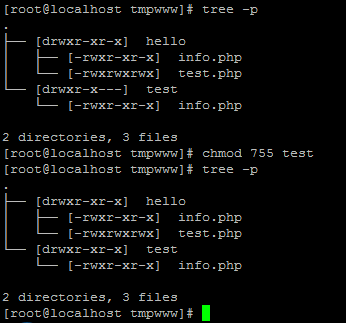
总结,对于php-fpm,网站目录必须至少可读,并且其路径中涉及到的各层级目录也必须保证至少可读,只有这样php-fpm及其worker进程才能访问到网站的根目录。
 粤ICP备2022112217号